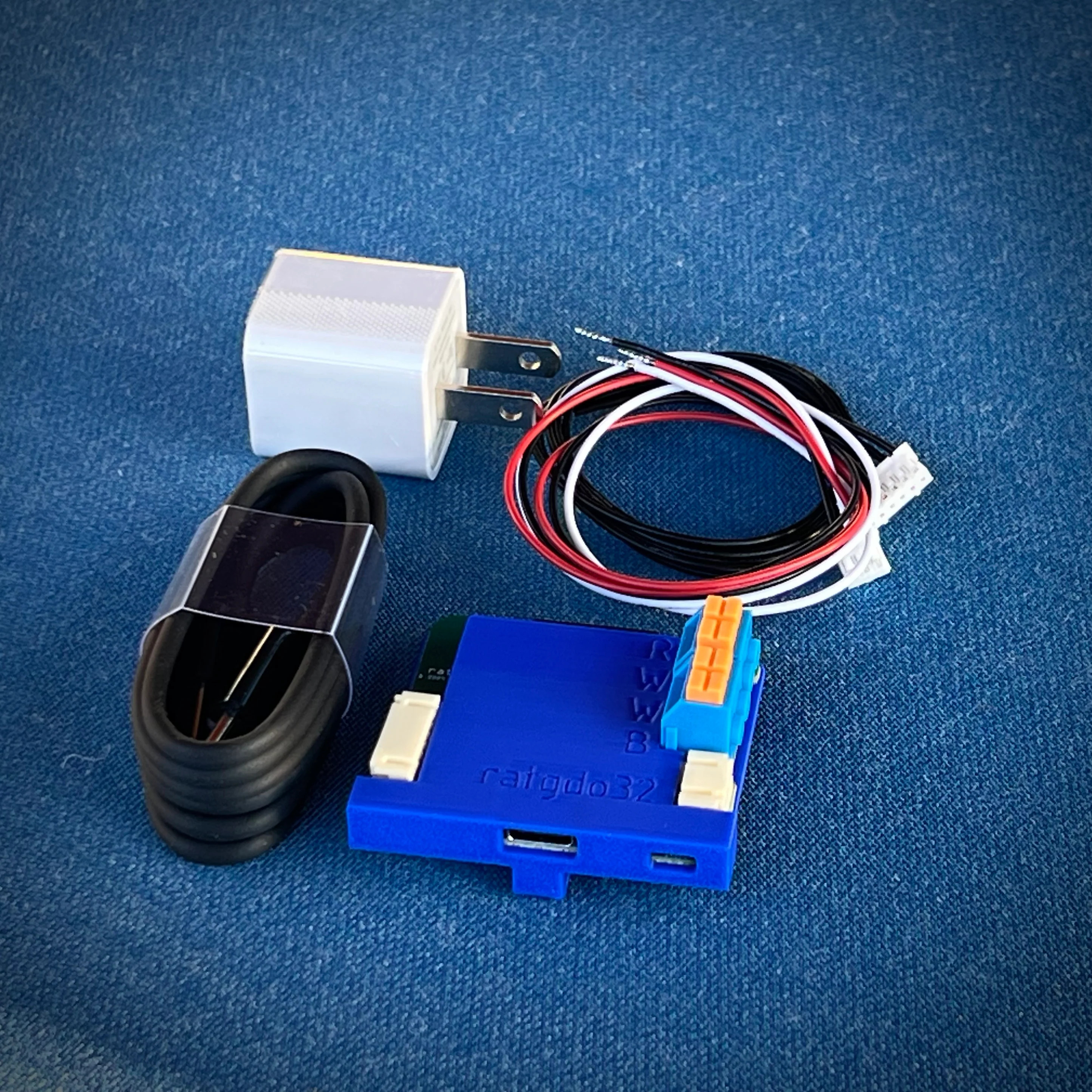
ratgdo32 – MyQ Bridge
$94.98
Upgrade your garage door with ratgdo32. Enjoy fast local WiFi control, Home Assistant integration, Apple HomeKit support, ESPHome, MQTT, and no monthly fees.
32 in stock
- Satisfaction Guaranteed
- No Hassle Refunds
- Secure Payments
Description
ratgdo32 – MyQ Bridge
The ratgdo32 is an open-source ESP32 WiFi garage door controller that gives you complete local control of compatible garage door openers through Apple HomeKit, Home Assistant, ESPHome, and MQTT.
Unlike myQ cloud services, ratgdo32 works entirely on your local network. There are no subscriptions, no cloud dependency, and no monthly fees. Commands execute instantly while your garage door data remains private.
The ratgdo32 is the successor to the original ratgdo and was the first hardware designed to fully communicate with Chamberlain and LiftMaster Security+ 2.0 garage door openers.
Hardware Specifications
What hardware does ratgdo32 use?
The ratgdo32 is powered by an ESP32 microcontroller and connects directly to your garage door opener using a simple three-wire connection.
| Specification | Details |
|---|---|
| Processor | ESP32 Dual-Core Xtensa LX6 (240 MHz) |
| Wireless | 2.4 GHz WiFi (802.11 b/g/n) |
| Power | USB-C, 5V DC |
| USB Interface | CH9102 USB-to-Serial |
| Installation | 3-wire connection |
| Mounting | Included clip-on holster |
| Operating Location | Indoor garages |
What’s Included?
What comes in the box?
Every ratgdo32 includes everything needed for installation.
- ratgdo32 ESP32 controller
- 3D printed mounting holster
- USB-C to USB-A cable
- 5V USB power adapter
- Pre-terminated wiring harness
Optional Accessories
- Magnetic mounting baseplate (sold separately)
Compatibility
Which garage door openers work with ratgdo32?
The ratgdo32 supports multiple garage door technologies, including Chamberlain, LiftMaster, Genie, and other openers that accept dry contact inputs.
Security+ 2.0 (Yellow Learn Button)
Best compatibility.
Compatible with most Chamberlain and LiftMaster garage door openers manufactured after 2011.
Supported features include:
- Open, close, and stop commands
- Real-time door position
- Light control
- Wireless remote lockout
- Safety sensor monitoring
- Motion detection (compatible wall panels)
Security+ 1.0 (Purple Learn Button)
Full support is available when using a compatible wall control such as:
- 889LM
- 041A7928-3MC
Features include:
- Door control
- Door status
- Light control
- Basic obstruction detection
Note: If you don’t have a compatible wall control, ratgdo32 offers an emulation mode. Some wall button functions may behave differently.
Dry Contact Garage Door Openers
The ratgdo32 also supports garage door and gate operators that use simple dry contact inputs.
This includes many openers from:
- Genie
- Chamberlain
- LiftMaster
- Commercial operators
- Custom gate controllers
Supported configurations include:
- Single-button operation
- Three-button Open / Stop / Close control
Firmware Options
Which firmware should you install?
The ratgdo32 ships without firmware so you can choose the platform that best matches your smart home.
ESPHome
Best for Home Assistant users.
ESPHome provides the deepest smart home integration with automatic discovery inside Home Assistant.
Features include:
- Native Home Assistant integration
- OTA updates
- MQTT support
- Complete device entities
- Active community support
Recommended for:
- Home Assistant
- Node-RED
- Control4
- Crestron
- Nice
- Elan
HomeKit Firmware
Best for Apple Home users.
No Home Assistant or bridge is required.
Features include:
- Native Apple HomeKit support
- Siri voice control
- Home app integration
- HomeKit automations
- OTA updates
- Motion and obstruction sensors
- Vehicle presence detection (Disco model)
MQTT Firmware
Best for advanced custom integrations.
Ideal if you want direct MQTT control or wish to disable WiFi for specialized dry-contact installations.
Smart Home Compatibility
Which smart home platforms work with ratgdo32?
The ratgdo32 integrates with most popular automation platforms.
| Platform | Integration |
|---|---|
| Apple HomeKit | Native firmware |
| Home Assistant | ESPHome or MQTT |
| Node-RED | MQTT or ESPHome |
| Control4 | Chowmain / FiniteLabs |
| Crestron | ESPHome |
| Nice | ESPHome |
| Elan | ESPHome |
| Google Home | Via Home Assistant |
| Amazon Alexa | Via Home Assistant |
Features
What can ratgdo32 control?
The ratgdo32 exposes nearly every garage door function available from supported openers.
Door Control
- Open
- Close
- Stop
- Real-time position updates
- Opening/Closing status
Light Control
- Turn lights on
- Turn lights off
- Discrete light commands
Security Features
- Wireless remote lockout
- Safety sensor monitoring
- Motion detection (supported wall panels)
Automation Ideas
What automations can you create?
The ratgdo32 works with Home Assistant, HomeKit, and MQTT automations.
Popular examples include:
- Automatically close the garage door after leaving home.
- Turn on hallway lights when the garage opens after sunset.
- Receive a notification if the garage remains open for more than 10 minutes.
- Disable wireless remotes while you’re on vacation.
- Trigger automations when your vehicle arrives home.
Installation
How do you install ratgdo32?
Installation typically takes 15 to 30 minutes and requires no soldering.
Step 1
Flash your preferred firmware using the browser-based installer.
Step 2
Connect the device to your 2.4 GHz WiFi network.
Step 3
Wire the supplied harness to the garage door opener.
Step 4
Mount the controller using the included holster.
Step 5
Add the device to Home Assistant or Apple Home.
Requirements
- Compatible garage door opener
- 2.4 GHz WiFi
- USB power source
- Google Chrome
- Computer for initial firmware installation
ratgdo32 vs ratgdo32 Disco
What’s the difference?
Choose the standard ratgdo32 if you only need garage door automation.
Choose the ratgdo32 Disco if you want advanced vehicle detection and parking assistance.
| Feature | ratgdo32 | ratgdo32 Disco |
|---|---|---|
| ESP32 | ✓ | ✓ |
| Door Control | ✓ | ✓ |
| Light Control | ✓ | ✓ |
| Lock Control | ✓ | ✓ |
| Obstruction Detection | ✓ | ✓ |
| Vehicle Detection | ✗ | ✓ |
| Parking Assist | ✗ | Optional |
| Built-in Speaker | ✗ | ✓ |
| Battery Support | ✗ | ✓ |
Troubleshooting
Why isn’t ratgdo32 working?
Most installation issues can be resolved in a few minutes.
Can’t connect over USB
Install the CH9102 USB driver and reconnect the device.
Slow web interface
Move the controller slightly away from the garage door opener to reduce RF interference.
Incorrect door status
Verify the wiring matches your opener model and confirm the correct protocol is selected.
HomeKit pairing problems
Reset the device and reconnect using a 2.4 GHz WiFi network.
OTA updates fail
Download the firmware manually and upload it through the built-in web interface.
Frequently Asked Questions
Does ratgdo32 require the myQ cloud?
No. ratgdo32 works entirely on your local network without cloud services or subscriptions.
Does ratgdo32 work with Apple HomeKit?
Yes. Install the HomeKit firmware to control your garage door directly from the Apple Home app without a bridge.
Does ratgdo32 work with Home Assistant?
Yes. ESPHome is the recommended firmware for Home Assistant and provides full local integration with automatic discovery.
Is internet access required?
No. Once installed, ratgdo32 can operate entirely on your local WiFi network.
Can I use ratgdo32 with Genie garage door openers?
Yes. Genie and many other brands are supported through the dry contact mode, provided the opener accepts momentary switch inputs.
Reviews
There are no reviews yet.